实现原理
在CloudWatch中创建规则用来定时调用lambda函数,lambda函数中编写启动和停止EC2实例的代码实现启动停止EC2实例。
实现前提和所创建的资源
要实现定时启停EC2实例需要CloudWatch规则来调用lambda函数启动和停止EC2实例,而lambda如果想要操作EC2 需要给lambda附加一个role 并要为role附加所需的权限。
综上创建的资源有:
- CloudWatch中创建了两个规则 StartInstance、StopInstance
- 四个分别用来启动和停止宁夏和北京区EC2实例的lambda函数 StopEC2Instances、StarEC2Instances、StopEC2InstancesForBeiJing、StarEC2InstancesForBeiJing
- 一个用来附加到lambda函数的role lambda_stop_start_ec2_rol
- 一个包含启停实例所需权限的策略lambda_stop_start_ec2,并将该策略附加到所创建的角色
各资源配置
CloudWatch规则
资源用途
- StartInstance用来在每天6:00调用启动EC2实例的lambda函数StarEC2Instances、StarEC2InstancesForBeiJing
- StopInstance用来在每天20:30调用停止EC2实例的lambda函数 StopEC2Instances、StopEC2InstancesForBeiJing
如何修改
- 想要修改EC2实例启停时间只需要修改CloudWatch规则的Corn表达式即可,Cron的具体格式可参考官方文档
此处一定注意!!!cron 使用的时间是UTC时间!环境是我们国内的话,时间要以当前北京时间-8:
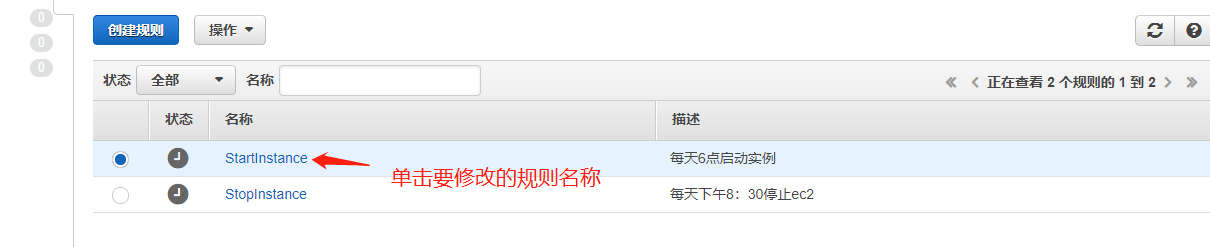
规则只有在启用状态才会执行进行启用和禁止操作可以实现对规则的启用和停止。
Lambda函数
资源和当前代码规则
- StopEC2Instances :stop宁夏区中具有特定标签(key:online value:day)且实例状态为running的EC2实例
- StarEC2Instances :启动宁夏区中具有特定标签(key:online value:day)且实例状态为stopped的EC2实例
- StopEC2InstancesForBeiJing :stop北京区中具有特定标签(key:online value:day)且实例状态为running的EC2实例
- StarEC2InstancesForBeiJing :启动北京区中具有特定标签(key:online value:day)且实例状态为stopped的EC2实例
函数代码修改
如果不想用key:online value:day的标签想用其他的标签则需要修改lambda函数代码(注意四个函数都要修改)点击要修改的lambda函数名找到函数代码部分,修改完点击保存。
IAM role和策略
- Role: lambda_stop_start_ec2_rol lambda所需的角色
- 策略lambda_stop_start_ec2:配置有lambda操作EC2所需的权限
直接启用
如果每天6:00启动20:30停止具有特定标签(key:online value:day)的EC2实例符合你的需求需要进行如下操作来启用:
1. 为要实现自动启停的实例配置标签且标签的key必须是online,value必须是day
2. 启用CloudWatch 规则:
Implementation Principle
Create rules in CloudWatch to periodically call lambda functions. The lambda functions contain code to start and stop EC2 instances.
Prerequisites and Created Resources
To implement scheduled start and stop of EC2 instances, CloudWatch rules are needed to call lambda functions to start and stop EC2 instances. For lambda to operate on EC2, a role needs to be attached to lambda and the required permissions need to be added to the role.
In summary, the created resources are:
- Two rules created in CloudWatch: StartInstance, StopInstance
- Four lambda functions for starting and stopping EC2 instances in Ningxia and Beijing regions: StopEC2Instances, StarEC2Instances, StopEC2InstancesForBeiJing, StarEC2InstancesForBeiJing
- A role to attach to lambda functions: lambda_stop_start_ec2_rol
- A policy containing the required permissions for start/stop instances: lambda_stop_start_ec2, attached to the created role
Resource Configuration
CloudWatch Rules
Resource Usage
- StartInstance is used to call the lambda functions StarEC2Instances and StarEC2InstancesForBeiJing at 6:00 every day to start EC2 instances
- StopInstance is used to call the lambda functions StopEC2Instances and StopEC2InstancesForBeiJing at 20:30 every day to stop EC2 instances
How to Modify
- To modify the EC2 instance start/stop time, just modify the Cron expression of the CloudWatch rule. For specific Cron format, refer to the official documentation.
Note!!! Cron uses UTC time! For our domestic environment, the time should be Beijing time - 8:
Rules only execute when enabled. Enable and disable operations can control the start and stop of rules.
Lambda Functions
Resources and Current Code Rules
- StopEC2Instances: Stop EC2 instances in Ningxia region with specific tag (key:online value:day) and instance status running
- StarEC2Instances: Start EC2 instances in Ningxia region with specific tag (key:online value:day) and instance status stopped
- StopEC2InstancesForBeiJing: Stop EC2 instances in Beijing region with specific tag (key:online value:day) and instance status running
- StarEC2InstancesForBeiJing: Start EC2 instances in Beijing region with specific tag (key:online value:day) and instance status stopped
Function Code Modification
If you don't want to use the key:online value:day tag and want to use other tags, you need to modify the lambda function code (note all four functions need to be modified). Click the lambda function name to modify, find the function code section, modify and click save.
IAM Role and Policy
- Role: lambda_stop_start_ec2_rol - the role required by lambda
- Policy lambda_stop_start_ec2: configured with the permissions required for lambda to operate EC2
Direct Enablement
If starting at 6:00 and stopping at 20:30 every day for EC2 instances with specific tag (key:online value:day) meets your needs, perform the following operations to enable:
1. Configure tags for the instances you want to automatically start/stop. The tag key must be online and value must be day
2. Enable CloudWatch rules: