随着越来越多的企业选择AWS之类的云计算服务,与此同时云计算环境也变得越来越复杂,因此企业必须制定全面、主动的安全策略,并从开始就建立起安全策略,并要随着基础架构的扩展而发展以保持系统和数据的安全。
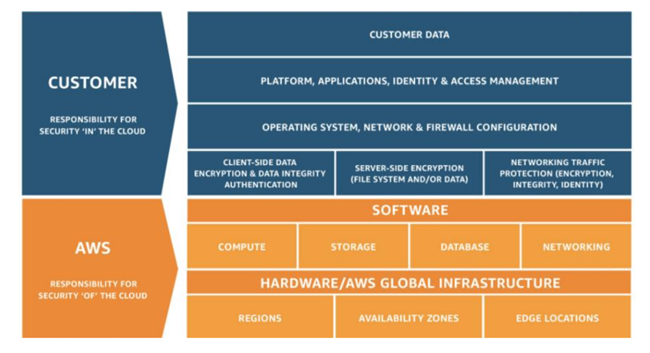
AWS基础架构的安全性已被设计为当今最具灵活、最安全的云计算环境之一。它的设计目标就是提供一个高度可扩展、高度可靠的平台,使客户能够快速安全地部署应用程序和数据。AWS运行在"责任共担"的安全模型之下。AWS负责底层的云基础设施的安全,其用户负责保护部署在AWS上的工作负载。
在AWS的提供的基础设施之中,Amazon Virtual Private Cloud (VPC)承担了非常重要的角色。VPC为我们带来了强大的网络功能,包括静态私有的IP地址、弹性网络接口、安全的Bastion(堡垒)主机设置、DHCP选项、高级网络访问控制、VPN连接、内部IPs和NICs在实例之间的转移等等。在网络安全方面,Amazon VPC 提供了安全组和网络访问控制列表等高级安全功能,可在实例和子网级别启用入站和出站筛选功能。了解更多关于使用Amazon VPC的最佳实践,对于无论正在维护现有的VPC网络,还是计划迁移到AWS环境的企业,都将是有益的。
一、选择满足需求的VPC配置
VPC 是网络架构的基础。设计一个良好的VPC网络架构需要考虑子网、互联网网关、NAT网关、虚拟私有网关、对等连接、VPC终端节点等等的合理配置与安全管理,并要满足具体业务的需求。尽管已经有了更改VPC大小的手段,但考虑到VPC的复杂性以及对于系统的重要程度,强烈建议在规划VPC的时候,建议根据至少两年后的扩展需求来设计Amazon VPC的具体实施。
今天,当我们在AWS管理控制台的"Amazon VPC"页面并选择"启动VPC向导"时,您将会看到用于网络架构的四个基本选项:
- 仅带有一个公有子网的 Amazon VPC
- 带有公有和私有子网的 Amazon VPC
- 带有公有和私有子网以及提供 AWS 站点到站点 VPN 访问的 Amazon VPC
- 仅带有一个私有子网以及提供 AWS 站点到站点 VPN 访问的 Amazon VPC
我们要仔细的考虑之后再去选择最适合当前和将来要求的配置。
二、为VPC选择恰当的CIDR
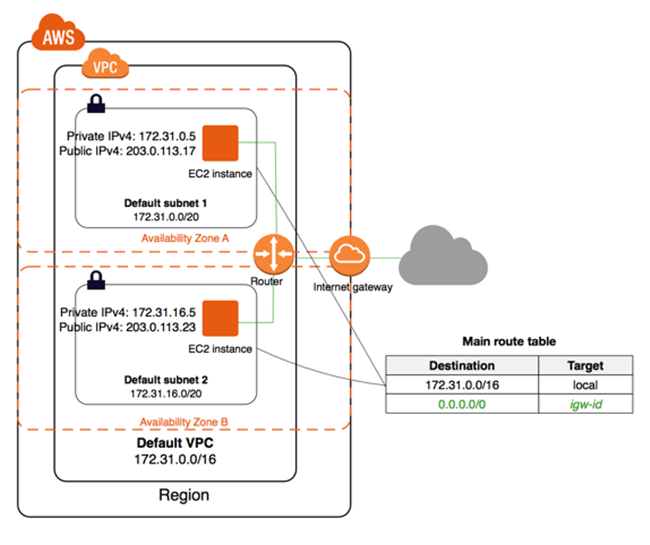
在设计Amazon VPC实例时,您必须考虑所需的IP地址数量以及与数据中心的连接类型,然后再选择CIDR块,其中包括 RFC 1918 或公有可路由 IP 范围。到目前为止,我们还无法更改或修改Amazon VPC设定的CIDR,因此最好选择具有更多IP地址的CIDR块。此外,在设计混合架构实现Amazon VPC与本地数据中心通信时,务必确保Amazon VPC中使用的CIDR范围不重叠或不会与本地数据中心中的CIDR块发生冲突。对于更改VPC大小的需求,可以通过向现有 VPC 添加4个辅助 IPv4 CIDR 来扩展 VPC。还可以通过删除已添加到 VPC 的辅助 CIDR 块来缩小 VPC。但是不能更改 VPC 的 IPv6 地址范围的大小。

三、隔离VPC环境
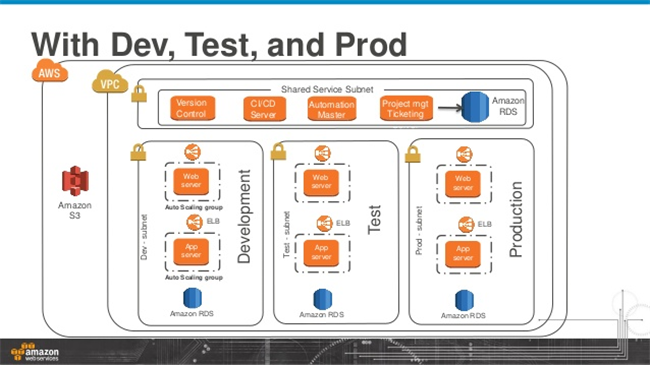
本地环境中存在的物理隔离也应该是云环境实践的一个重要原则。许多最佳实践表明,最好为开发、生产和发布(Staging)建一个独立的Amazon VPC。有许多人习惯在一个VPC中管理预发布、生产和开发等环境,不过管理这样具有不同安全权重的Amazon VPC其难度之大是可想而知的。相比之下,我更建议不同的环境使用独立的VPC。
四、增强对AWS VPC的保护
运行具有关键任务工作负载的系统需要多个层次的安全性。通过遵循以下一些有用的方法,可以有效的保护Amazon VPC:
- AWS WAF 是一种Web应用程序防火墙,可帮助保护部署在VPC上的Web应用程序和API免遭常见Web漏洞的攻击,这些漏洞可能会影响可用性、损害安全性或消耗过多的资源。
- Amazon Web Services Marketplace提供了第三方提供的Web应用程序防火墙、防火墙以及可用于保护Amazon VPC的其他一些工具。
- 为了防止未经授权使用或入侵网络,可以配置入侵检测系统(IDS)和入侵防御系统(IPS)。
- 借助特权身份访问管理,可以审核和监视管理员对VPC的访问。
- 为了在不同区域之间的Amazon VPC之间或在Amazon VPC之间安全地将信息传输到本地数据中心,可以配置Site-to-Site VPN。
- 安全传输信息的另一种选择是将AWS Transfer用于安全的文件(AWS SFTP)。借助AWS SFTP,可以使用VPC终端节点,并避免使用公共IP地址或通过互联网。此外,AWS SFTP的VPC终端节点通过AWS PrivateLink利用安全功能,该功能在VPC和AWS服务之间提供专用连接。
五、理解VPC上的网络防火墙与安全
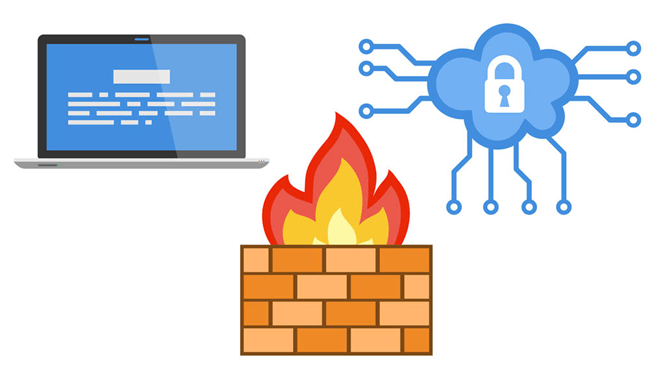
AWS通过"安全组"提供了一种虚拟防火墙功能,可在实例级别控制入站和出站的数据流。但是管理AWS网络安全的方式与传统网络防火墙的使用方式有所不同。AWS防火墙的中心组件是"安全组",基本上是其他防火墙供应商称为策略(或者规则的集合)的组。但是,需要了解安全组和传统防火墙策略之间的关键区别。
首先,在AWS中,安全组的规则中没有特定的"操作"来声明流量是允许还是丢弃。这是因为与传统的防火墙规则不同,AWS安全组中的规则缺省都是允许的。
第二,AWS安全组规则可以指定流量来源或流量目的地,但不能在同一规则上同时指定两者。对于入站规则,有一个来源可以说明流量的来源,但没有目的地告诉流量该去向。对于出站规则,反之亦然:我们可以设定目标,但不能指定源。这样做的原因是,AWS安全组始终将未指定的一面(源或目的地)设置为使用该安全组的EC2实例。
AWS在允许应用这些安全组规则方面非常灵活。可以将传统安全策略应用于多个防火墙的方式相同,我们可以将单个安全组应用于多个实例。AWS还允许执行与之相反的操作——将多个安全组应用于单个EC2实例,这意味着该实例从与其关联的所有安全组中继承规则。这是AWS独特功能之一,使我们可以为特定功能或操作系统创建安全组,然后对其进行混合和匹配以适应业务需求。
六、如无需要,请勿打开端口
通过在安全组中开放 0.0.0.0/0(IPv6下为::/0)的端口来允许VPC中的实例是很多专业人员在配置安全组时最常见的错误。用户最终打开了他们的云网络,并将其云资源和数据暴露于外部威胁。制定安全组中的策略时需要遵循"最小权限原则"(POLP),仅开放所需的端口,而不是为了简化管理而让网络暴露在威胁之下。同样,我们还要关闭不必要的系统端口。
七、启用和配置VPC流日志
我们现在可以为VPC或子网或网络接口(ENI)级别启用AWS VPC流日志,可以捕获有关传入和传出 VPC 中网络接口的 IP 流量的信息。我们通常可以将AWS VPC流日志配置为捕获流经EC2、ELB和一些其他服务的ENI和安全组的接受和拒绝条目。通过扫描这些VPC流日志的条目,用以检测攻击模式,警告VPC内部异常活动和信息流。
我们不必担心VPC流日志对于生产环境网络的影响,流日志数据的收集是在VPC网络流量路径之外,因此不会影响网络吞吐量或延迟。
八、用好VPC对等(VPC Peering)
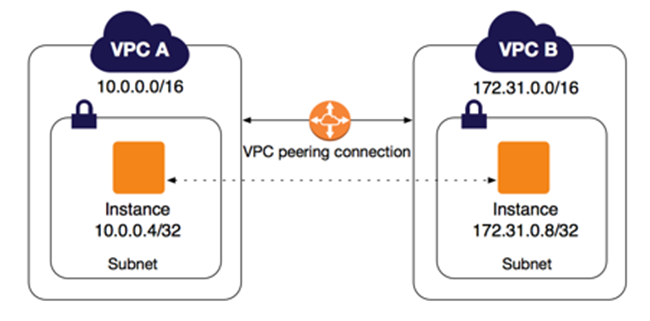
VPC 对等连接是两个 VPC 之间的网络连接,通过此连接,您可以使用私有 IPv4 地址或 IPv6 地址在两个 VPC 之间路由流量。这两个 VPC 中的实例可以彼此通信,就像它们在同一网络中一样。
AWS 使用 VPC 的现有基础设施来创建 VPC 对等连接;该连接既不是网关也不是 VPN 连接,并且不依赖某一单独的物理硬件。没有单点通信故障也没有带宽瓶颈。
从安全性上来说,VPC对等的网络流量保留在私有 IP 空间中。所有区域间流量都经过加密,没有单点故障或带宽瓶颈。流量一直处于全球 AWS 骨干网中,不会经过公共Internet,这样可以减少面临的威胁,例如常见漏洞和 DDoS 攻击。通常,VPC对等可满足许多需求,例如:
- 互连的应用程序需要在AWS内部进行私有和安全访问。通常,这可能发生在在单个区域中运行多个VPC的大型企业中。
- 系统已由某些业务部门部署在不同的AWS账户中,并且需要共享或私有使用。某些大型组织为各个业务部门、部门或团队拥有不同的AWS账户,并且各组之间的通信需求也有所不同。
- 更好的系统集成访问,例如客户可以将其VPC与核心供应商的VPC对等。
九、最廉价的安全工具——标签(Tag)
没看错,我说的就是"标签"。在VPC中对资源的标记非常重要。我们可以,并非常希望这样做,使用标记策略来有效地组织用于管理、报告、分析的资源。对于大型的复杂的网络基础设施,我们的管理会有很多角度,对安全问题尤其如此。考虑到这一点,请通过使用任何标记策略来保持最佳做法,并在变化时及时进行修改。当我们的采用越来越多自动化的工具的时候,你会意识到一个良好的标签设计将会为VPC的安全性、可管理性起到何种重要的作用。
十、将安全性集成到DevOps
无可否认,云计算是一个全新的领域,云计算的安全面临的风险与挑战与日俱增。市场上没有足够的安全计算安全专家,企业也很难找到精通最新云计算技术的专业人员。即使团队雇用了优秀的安全人员,那些可以编写代码的人员也经常被用于开发而不是安全管理。
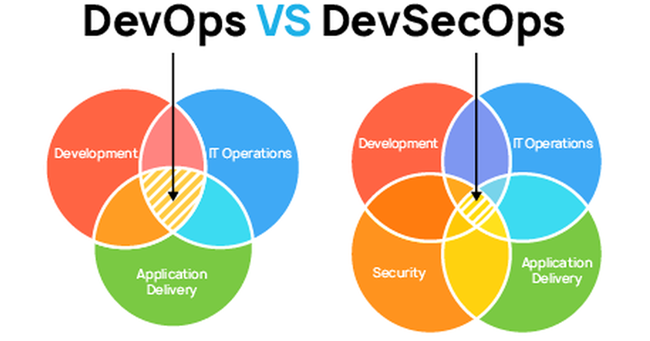
一个好的经验是,无论企业是否拥有安全运营中心(SOC)或者信息安全(Infosec)专家,都可以实现安全。在现代化的组织中,安全性不仅应由安全专家或者SecOps团队负责,而应该是整个团队、自上到下的共同努力的目标。请记住这一点,团队中的工具和流程越好,所需的安全专家就越少。我的建议是:
- 建立具有安全性的DevOps文化,可以概括为"提高组织的安全文化"。
- 全员进行安全培训。安全是每个人的工作——不仅仅是那些工作头衔上有安全的人的工作。
- 在企业中确立"人+责任 = 安全"的意识。
文章来源:https://aws.amazon.com/cn/blogs/china/ten-best-practices-for-vpc-security/
返回技术博客
As more and more enterprises choose cloud computing services like AWS, cloud computing environments are becoming increasingly complex. Enterprises must develop comprehensive and proactive security strategies, establishing them from the start and evolving them as infrastructure expands to maintain the security of systems and data.
AWS infrastructure security has been designed as one of the most flexible and secure cloud computing environments available today. Its design goal is to provide a highly scalable and highly reliable platform that enables customers to quickly and securely deploy applications and data. AWS operates under a "shared responsibility" security model. AWS is responsible for the security of the underlying cloud infrastructure, while users are responsible for protecting workloads deployed on AWS.
Among the infrastructure provided by AWS, Amazon Virtual Private Cloud (VPC) plays a very important role. VPC brings powerful networking capabilities, including static private IP addresses, elastic network interfaces, secure Bastion host setup, DHCP options, advanced network access control, VPN connections, and transfer of internal IPs and NICs between instances. In terms of network security, Amazon VPC provides advanced security features such as security groups and network access control lists, enabling inbound and outbound filtering at the instance and subnet levels. Understanding best practices for using Amazon VPC is beneficial for enterprises whether they are maintaining existing VPC networks or planning to migrate to AWS environments.
1. Choose the Right VPC Configuration for Your Needs
VPC is the foundation of your network architecture. Designing a good VPC network architecture requires careful consideration of subnets, internet gateways, NAT gateways, virtual private gateways, peering connections, VPC endpoints, and more. Although there are ways to resize a VPC, given the complexity and importance of VPC to your systems, it is strongly recommended that when planning your VPC, you design your Amazon VPC based on expansion needs at least two years into the future.
Today, when you go to the "Amazon VPC" page in the AWS Management Console and select "Launch VPC Wizard," you will see four basic options for network architecture:
- Amazon VPC with a Single Public Subnet
- Amazon VPC with Public and Private Subnets
- Amazon VPC with Public and Private Subnets and AWS Site-to-Site VPN Access
- Amazon VPC with a Private Subnet Only and AWS Site-to-Site VPN Access
Carefully consider your current and future requirements before selecting the most appropriate configuration.
2. Choose the Right CIDR for Your VPC
When designing your Amazon VPC, you must consider the number of IP addresses needed and the type of connection to your data center before selecting a CIDR block, including RFC 1918 or publicly routable IP ranges. Currently, you cannot change or modify the CIDR set for an Amazon VPC, so it is best to choose a CIDR block with more IP addresses. Additionally, when designing a hybrid architecture for Amazon VPC to communicate with on-premises data centers, ensure that the CIDR ranges used in Amazon VPC do not overlap or conflict with CIDR blocks in your on-premises data center. To resize a VPC, you can expand it by adding up to 4 secondary IPv4 CIDRs to the existing VPC, or shrink it by removing secondary CIDR blocks. However, you cannot change the size of the IPv6 address range of a VPC.
3. Isolate VPC Environments
Physical isolation that exists in on-premises environments should also be an important principle in cloud environment practices. Many best practices indicate that it is best to create a separate Amazon VPC for development, production, and staging. Many people are accustomed to managing pre-release, production, and development environments in a single VPC, but managing such an Amazon VPC with different security weights is extremely challenging. Instead, I recommend using separate VPCs for different environments.
4. Strengthen Protection of Your AWS VPC
Systems running mission-critical workloads require multiple layers of security. The following approaches can effectively protect your Amazon VPC:
- AWS WAF is a web application firewall that helps protect web applications and APIs deployed on VPCs from common web exploits that could affect availability, compromise security, or consume excessive resources.
- The Amazon Web Services Marketplace offers third-party web application firewalls, firewalls, and other tools that can be used to protect Amazon VPC.
- To prevent unauthorized use or intrusion into the network, you can configure Intrusion Detection Systems (IDS) and Intrusion Prevention Systems (IPS).
- With privileged identity access management, you can audit and monitor administrator access to VPCs.
- To securely transfer information between Amazon VPCs across different regions or between Amazon VPCs and on-premises data centers, you can configure Site-to-Site VPN.
- Another option for secure information transfer is AWS Transfer for Secure File Transfer (AWS SFTP). With AWS SFTP, you can use VPC endpoints and avoid using public IP addresses or going through the internet. Additionally, AWS SFTP's VPC endpoints leverage security features through AWS PrivateLink, which provides a dedicated connection between VPCs and AWS services.
5. Understand Network Firewalls and Security on VPC
AWS provides a virtual firewall function through "security groups" that controls inbound and outbound traffic at the instance level. However, managing AWS network security differs from using traditional network firewalls. The central component of AWS firewalls is the "security group," which is essentially what other firewall vendors call a policy (or collection of rules). However, it is important to understand the key differences between security groups and traditional firewall policies.
First, in AWS, security group rules do not have a specific "action" to declare whether traffic is allowed or dropped. This is because, unlike traditional firewall rules, rules in AWS security groups are allowed by default.
Second, AWS security group rules can specify either a traffic source or a traffic destination, but not both in the same rule. For inbound rules, there is a source that indicates where traffic comes from, but no destination telling traffic where to go. For outbound rules, the reverse is true: you can set a destination but cannot specify a source. The reason is that AWS security groups always set the unspecified side (source or destination) to the EC2 instance using that security group.
AWS is very flexible in allowing these security group rules to be applied. Just as traditional security policies can be applied to multiple firewalls, you can apply a single security group to multiple instances. AWS also allows the reverse — applying multiple security groups to a single EC2 instance, meaning that instance inherits rules from all associated security groups. This is one of AWS's unique features, allowing you to create security groups for specific functions or operating systems and then mix and match them to meet business needs.
6. Do Not Open Ports Unless Necessary
Opening ports for 0.0.0.0/0 (or ::/0 for IPv6) in security groups to allow instances in a VPC is one of the most common mistakes professionals make when configuring security groups. Users end up opening their cloud network and exposing their cloud resources and data to external threats. When formulating policies in security groups, follow the Principle of Least Privilege (POLP) — only open the ports that are needed, rather than exposing the network to threats for the sake of simplified management. Similarly, close unnecessary system ports.
7. Enable and Configure VPC Flow Logs
You can now enable AWS VPC Flow Logs at the VPC, subnet, or network interface (ENI) level to capture information about IP traffic flowing to and from network interfaces in your VPC. You can typically configure AWS VPC Flow Logs to capture accepted and rejected entries for ENIs and security groups flowing through EC2, ELB, and some other services. By scanning these VPC flow log entries, you can detect attack patterns and alert on abnormal activity and traffic within the VPC.
You don't need to worry about the impact of VPC flow logs on your production network. Flow log data collection occurs outside the VPC network traffic path, so it does not affect network throughput or latency.
8. Make Good Use of VPC Peering
A VPC peering connection is a networking connection between two VPCs that enables you to route traffic between them using private IPv4 or IPv6 addresses. Instances in either VPC can communicate with each other as if they are within the same network.
AWS uses the existing infrastructure of a VPC to create a VPC peering connection; it is neither a gateway nor a VPN connection, and does not rely on a separate piece of physical hardware. There is no single point of communication failure and no bandwidth bottleneck.
From a security perspective, VPC peering network traffic stays within the private IP space. All inter-region traffic is encrypted, with no single point of failure or bandwidth bottleneck. Traffic stays within the global AWS backbone and never traverses the public internet, reducing exposure to threats such as common exploits and DDoS attacks. VPC peering can meet many needs, such as:
- Interconnected applications that need private and secure access within AWS. This often occurs in large enterprises running multiple VPCs in a single region.
- Systems deployed by business units in different AWS accounts that need shared or private access. Some large organizations have different AWS accounts for various business units, departments, or teams, with varying communication needs between groups.
- Better system integration access, such as customers peering their VPC with a core vendor's VPC.
9. The Cheapest Security Tool — Tags
That's right — tags. Tagging resources in your VPC is extremely important. You can, and should, use tagging strategies to effectively organize resources for management, reporting, and analysis. For large and complex network infrastructure, there are many angles to management, especially for security issues. With this in mind, maintain best practices through any tagging strategy and update it promptly when things change. As you adopt more and more automation tools, you will realize how important a well-designed tagging scheme is for the security and manageability of your VPC.
10. Integrate Security into DevOps
Undeniably, cloud computing is a new frontier, and the risks and challenges of cloud security are growing daily. There are not enough cloud security experts in the market, and it is difficult for enterprises to find professionals proficient in the latest cloud computing technologies. Even when teams hire excellent security personnel, those who can write code are often used for development rather than security management.
A good rule of thumb is that security can be achieved regardless of whether an enterprise has a Security Operations Center (SOC) or Information Security (Infosec) experts. In modern organizations, security should not only be the responsibility of security experts or SecOps teams — it should be a shared goal across the entire team, from top to bottom. Keep in mind that the better the tools and processes in your team, the fewer security experts you need. My recommendations are:
- Build a DevOps culture with security built in, which can be summarized as "improving the organization's security culture."
- Provide security training for all staff. Security is everyone's job — not just those with "security" in their job title.
- Establish the awareness of "People + Responsibility = Security" throughout the enterprise.
Source: https://aws.amazon.com/cn/blogs/china/ten-best-practices-for-vpc-security/
Back to Tech Blog