背景
目前已经有许多AWS EKS的客户通过使用ALB Ingress Controller来实现南北向七层流量的导入。在项目实施过程中碰到的一个比较集中的问题就是如何使用同一个Application Load Balancer(ALB)来实现对入口流量按照多个路由规则匹配来转发到EKS集群中运行的多个服务或者Pod内,避免因为多服务或者微服务架构中产生的大量服务对应生成几十个甚至数百个ALB的情况。
本文分为上下两篇,分别介绍在EKS上发布多个服务以及单个服务的不同方法,同时提供具体的操作步骤供大家动手实验。
上篇通过具体的示例演示在同一个ALB Ingress Controller(V1)Ingress对象上通过扩展ALB Rule增加不同的URL路径映射来实现这个需求。同时随着AWS Load Balancer Controller在2020年10月份的发布,通过新的Annotation alb.ingress.kubernetes.io/group.name 来支持在不同的Ingress对象上共享同一个ALB。
原理
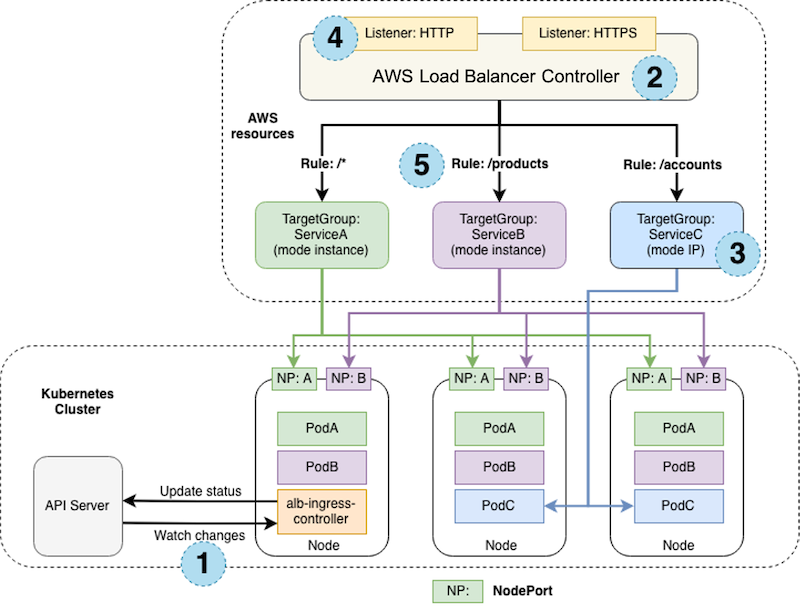
下图介绍了AWS Load Balancer Controller创建的AWS组件,以及用户端流量经过ALB,然后通过URL路径匹配将不同路径的HTTP(S)请求转发到在K8S节点上Pod的过程。
操作步骤
前提:当前使用的用户具有 Administrator Access 权限。
准备Cloud9实验环境
在AWS管理控制台中选择Cloud9服务,创建一个名称为 eksworkshop 的环境,将Cost-saving setting选项设置为 After four hours,其他配置保持默认。创建完毕后在主工作区中打开一个新的Terminal。
在IAM服务中创建一个名称为 eksworkshop-admin 的角色,确认 AWS service 和 EC2 被选中,添加 AdministratorAccess 策略,完成创建。
在EC2服务中查看刚刚创建的Cloud9环境对应的EC2实例,选中该实例,在菜单选择 Actions / Security / Modify IAM Role,选择 eksworkshop-admin 角色,点击保存。
返回Cloud9环境,关闭 AWS managed temporary credentials,然后在Terminal中运行以下命令确认临时秘钥凭证已被删除,并验证ARN中包含 eksworkshop-admin:
rm -vf ${HOME}/.aws/credentials
aws sts get-caller-identity
下篇文章请参考:在AWS EKS上发布K8S服务(下)
返回技术博客
Background
Many AWS EKS customers use the ALB Ingress Controller to handle north-south Layer 7 traffic ingress. A common challenge is how to use a single Application Load Balancer (ALB) to route incoming traffic to multiple services or Pods in an EKS cluster based on multiple routing rules — avoiding the proliferation of dozens or hundreds of ALBs in microservice architectures.
This two-part series covers different methods for publishing multiple and single services on EKS, with hands-on steps for each.
Part 1 demonstrates how to use a single ALB Ingress Controller (V1) Ingress object with extended ALB rules and different URL path mappings. It also covers the new alb.ingress.kubernetes.io/group.name annotation introduced in AWS Load Balancer Controller (V2, released October 2020) for sharing a single ALB across multiple Ingress objects.
How It Works
The diagram below shows the AWS components created by the AWS Load Balancer Controller and how user traffic flows through the ALB, with HTTP(S) requests routed to Pods based on URL path matching.
Steps
Prerequisite: The current user must have Administrator Access permissions.
Set Up the Cloud9 Environment
In the AWS Management Console, open Cloud9 and create an environment named eksworkshop. Set Cost-saving to "After four hours" and leave other settings as default. Once created, open a new Terminal in the main workspace.
In IAM, create a role named eksworkshop-admin with EC2 as the trusted entity and the AdministratorAccess policy attached.
In EC2, find the instance for the Cloud9 environment, then go to Actions / Security / Modify IAM Role and select the eksworkshop-admin role.
Back in Cloud9, disable AWS managed temporary credentials, then run the following commands to confirm the temporary credentials are removed and verify the ARN contains eksworkshop-admin:
rm -vf ${HOME}/.aws/credentials
aws sts get-caller-identity
Continue to: Deploying K8S Services on AWS EKS (Part 2)
Back to Tech Blog