一、背景介绍
我们看到一些国内的AWS用户,在使用企业微信和钉钉作为内部工作沟通平台。他们希望将Amazon CloudWatch接收到的监控、告警信息发送到企业微信和钉钉等即时通讯工具中,方便统一运维。
在这篇文章中,我们将介绍如何通过Amazon SNS和AWS Lambda来实现将AWS CloudWatch告警信息发送到企业微信和钉钉。
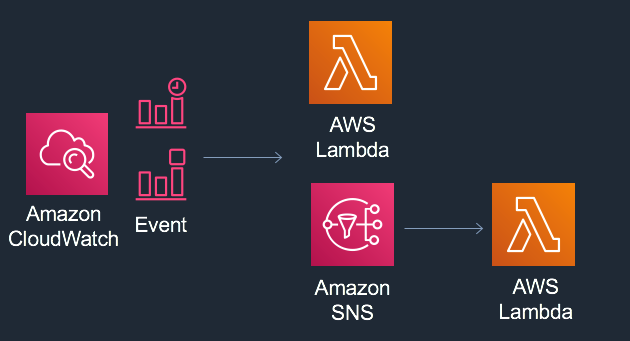
CloudWatch与SNS、Lambda配合使用常见流程:
二、方案架构
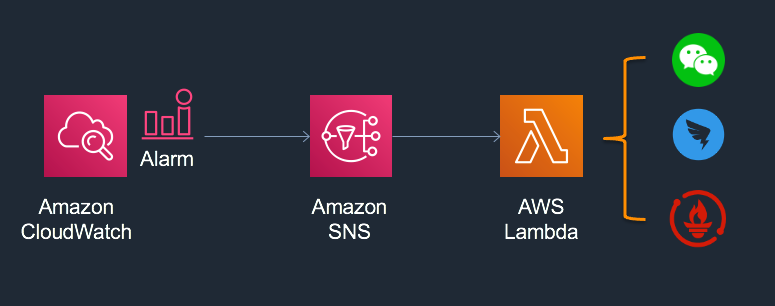
本方案中CloudWatch接收EC2运行指标并进行监控。当EC2指标超出设定阈值后,CloudWatch触发告警事件,并将事件消息通过SNS发送到Lambda函数。Lambda函数执行用户自定义的代码,包括:解析告警消息并发送到企业微信、钉钉机器人等平台。
架构中AWS服务简介:
- Amazon CloudWatch:收集AWS各种服务运行日志和用户应用程序日志,可设置基于指标的告警、基于时间和事件的规则
- AWS Lambda:无服务器的函数计算服务,无需预置或管理服务器即可运行代码
- Amazon SNS:完全托管型消息收发服务,用于应用与应用之间以及应用与人之间通信
三、使用企业微信接收CloudWatch告警
企业微信端设置
- 注册企业微信账号
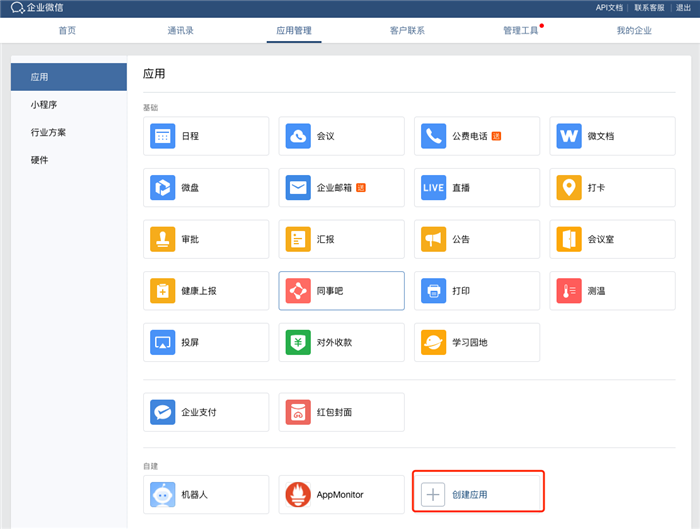
- 在企业微信中创建应用
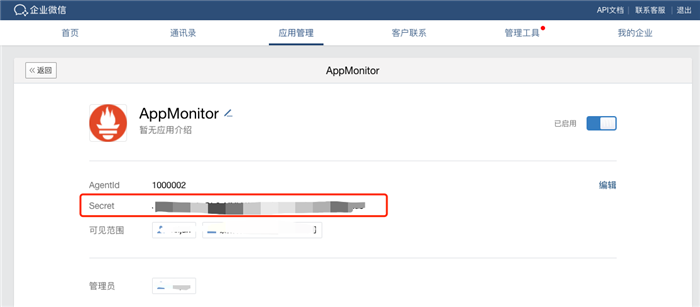
创建完成后记录应用 Secret。

获取 access_token
参考微信官方说明文档,示例代码:
tokenUrl = "https://qyapi.weixin.qq.com/cgi-bin/gettoken"

def get_token():
    values = {'corpid': '<corpid>', 'corpsecret': '<corpsecret>'}
    req = requests.post(tokenUrl, params=values)
    data = json.loads(req.text)
    return data["access_token"]
返回技术博客
1. Background
Many AWS users in China use WeChat Work (Enterprise WeChat) and DingTalk as their internal communication platforms. They want to receive Amazon CloudWatch monitoring and alert notifications directly in these tools for unified operations management.
This article explains how to use Amazon SNS and AWS Lambda to forward AWS CloudWatch alerts to WeChat Work and DingTalk.
The typical flow for CloudWatch + SNS + Lambda:
2. Solution Architecture
In this solution, CloudWatch monitors EC2 metrics. When a metric exceeds the configured threshold, CloudWatch triggers an alarm and sends the event message via SNS to a Lambda function. The Lambda function executes custom code to parse the alarm message and forward it to WeChat Work, DingTalk bots, or other platforms.
AWS services in this architecture:
- Amazon CloudWatch: Collects logs and metrics from AWS services and applications; supports metric-based alarms and event-driven rules
- AWS Lambda: Serverless compute service — run code without provisioning or managing servers
- Amazon SNS: Fully managed messaging service for application-to-application and application-to-person communication
3. Receiving CloudWatch Alerts via WeChat Work
WeChat Work Setup
- Register a WeChat Work account
- Create an application in WeChat Work
After creation, record the application Secret.
Get access_token
Refer to the WeChat Work API documentation. Sample code:
tokenUrl = "https://qyapi.weixin.qq.com/cgi-bin/gettoken"

def get_token():
    values = {'corpid': '<corpid>', 'corpsecret': '<corpsecret>'}
    req = requests.post(tokenUrl, params=values)
    data = json.loads(req.text)
    return data["access_token"]
Back to Tech Blog