使用公有云服务只需点击几下就可以轻松灵活地创建一个基础架构,但如果你因此而忽略了某些安全检查点,则它可能会为恶意攻击者提供许多的机会。Amazon Inspector是一种自动化安全评估服务,可根据Amazon云中的合规性评估已部署资源的安全漏洞。在本文中,我们将了解AWS Inspector如何与EC2实例通信以评估服务器的安全性。我们还将学习如何配置AWS Inspector以执行自动化安全评估任务。
Inspector原理
AWS inspector是在所有EC2实例中安装一个代理,然后在内部检查所有可能的漏洞,并提供包含建议缓解措施的详细报告。其中包含了所选资源的详细结果。它会根据漏洞的严重程度对漏洞进行优先级排序,从而使你可以轻松了解哪些软件需要立即进行修补。
Inspector评估规则包
网络可到达性规则包
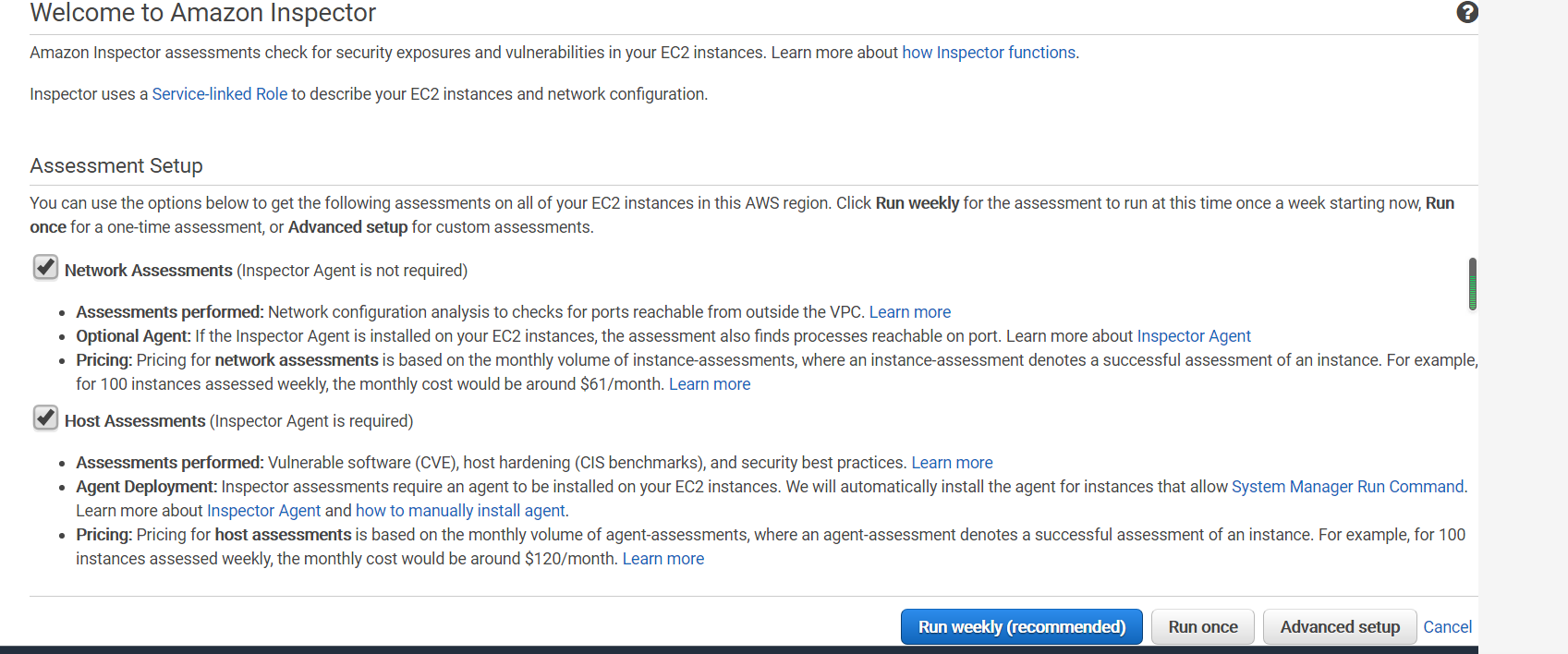
网络可到达性包中的规则分析您的网络配置以查找您的 EC2 instances 的安全漏洞。这些规则生成的结果表明是否可从 Internet(通过 Internet 网关,包括 Application Load Balancer 或 Classic Load Balancer 后的实例)、VPC 对等连接或 VPN(通过虚拟网关)到达您的端口。这些结果还强调了允许潜在恶意访问的网络配置(如管理不当的安全组、ACL、IGW 等)。利用此规则包,无需 Amazon Inspector 代理即可评估您的 EC2 instance。
主机评估规则包
常见漏洞和风险
Amazon Inspector 主机评估规则包使用的代理部署在运行着要评估的应用程序的 Amazon EC2 实例上。它将使用最佳安全实践指南检查服务器。此包中的规则将帮助验证您的评估目标中的 EC2 instances是否易出现常见漏洞和曝光 (CVE)。
CVE@是一份关于公开已知的网络安全漏洞的声明清单,每条声明都包含一个识别号码、描述和至少一个公开引用。CVE条目被用于世界各地的许多网络安全产品和服务中,包括美国国家脆弱性数据库(NVD)。
如果 Amazon Inspector 评估生成的结果中出现特定的 CVE,您可在 https://cve.mitre.org/ 中搜索 CVE 的ID(例如,CVE-2009-0021)。搜索结果可提供有关此CVE其严重性和缓解方式的详细信息。
Center for Internet Security (CIS) 基准
CIS 安全基准计划提供了定义明确、公正、基于一致性的行业最佳实践来帮助组织评估和增强其安全性。
如果 Amazon Inspector 评估运行生成的结果中出现特定的 CIS 基准,您可从 https://benchmarks.cisecurity.org/ 下载此基准的 PDF 格式的详细描述(需要免费注册)。此基准文档提供了有关此 CIS 基准其严重性以及如何缓解它的详细信息。
Amazon Inspector 的安全最佳实践
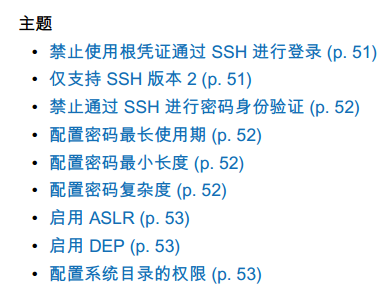
使用 Amazon Inspector 规则帮助确定您的系统的配置是否安全。主题包含如下内容:
Inspector如何收费
网络可访问性规则包的定价
使用网络可访问性规则包的 Amazon Inspector 评估按每月每个实例评估进行定价。例如,如果您对 1 个实例运行 1 次评估,则为 1 个实例评估。例如,如果您对 10 个实例运行 1 次评估,则为 10 个实例评估。起价为每个月每个实例评估 0.15 USD。
主机评估规则包的定价
使用主机规则包的评估按每月每个代理评估进行定价。例如,如果您对 1 个代理运行 1 次评估,则为 1 个代理评估。如果您对 10 个代理运行 1 次评估,则为 10 个代理评估。起价为每个月每个实例评估 0.30 USD。
Inspector实践
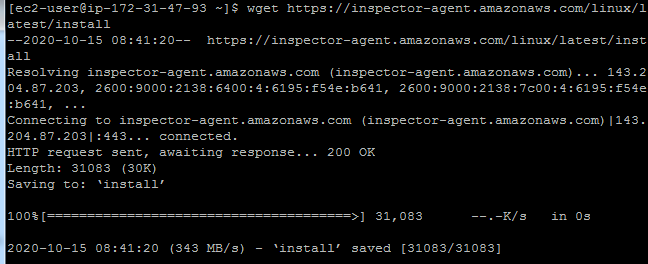
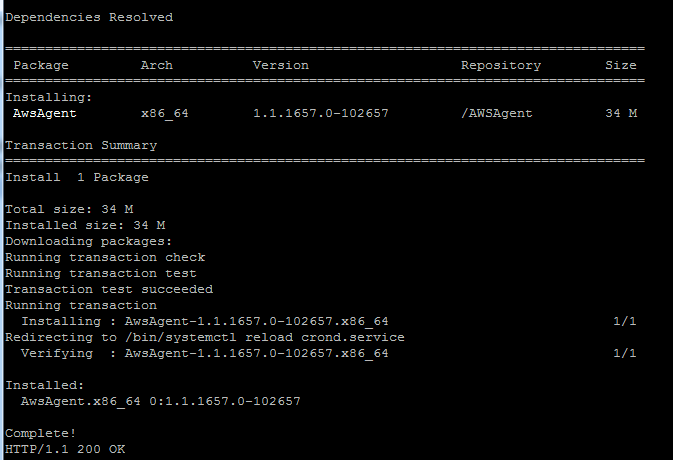
下载安装包,安装Agent
配置运行Inspector扫描
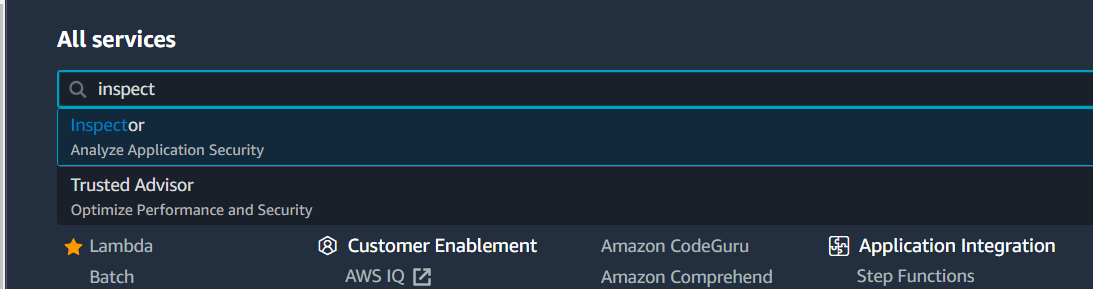
进入Inspector产品模块
配置选择规则包
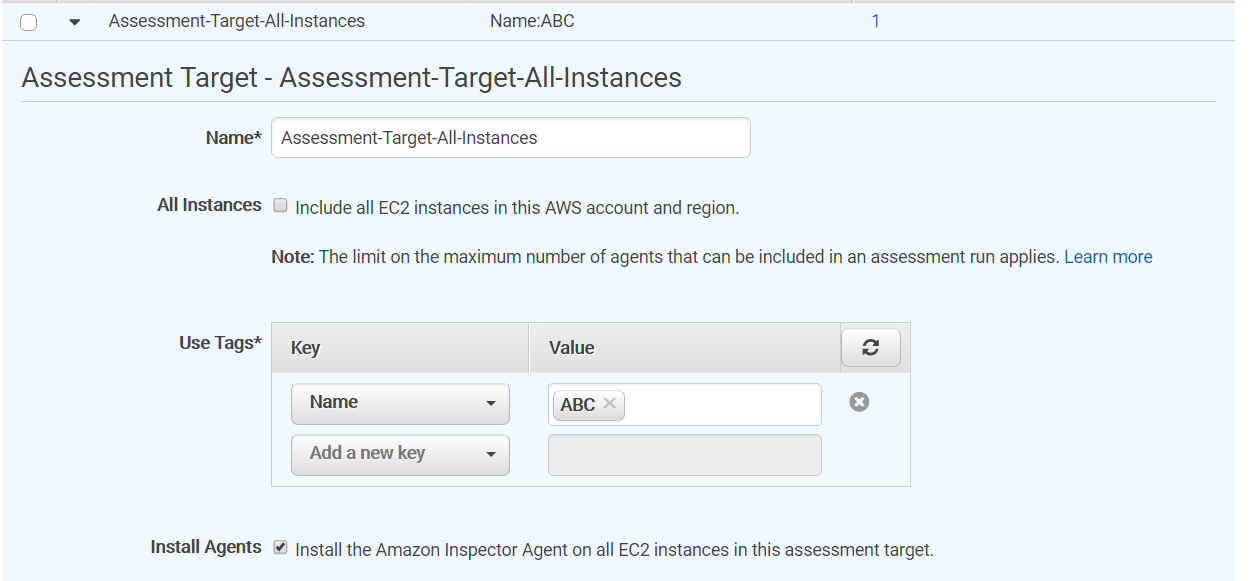
定义目标
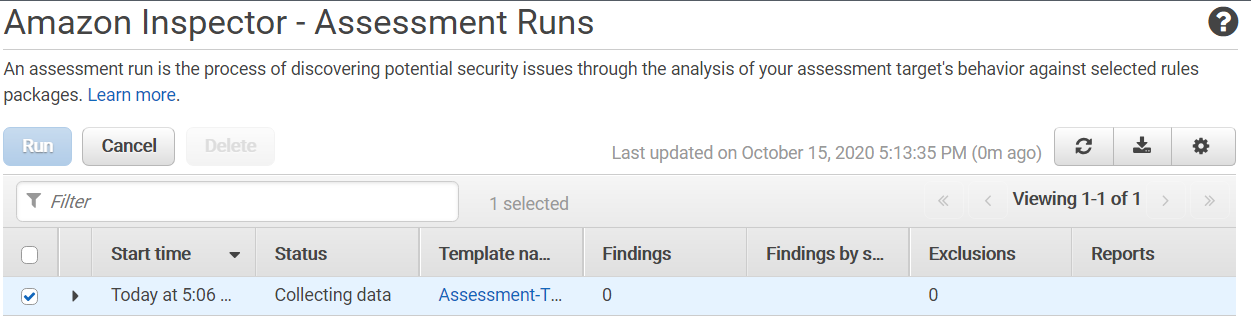
运行扫描
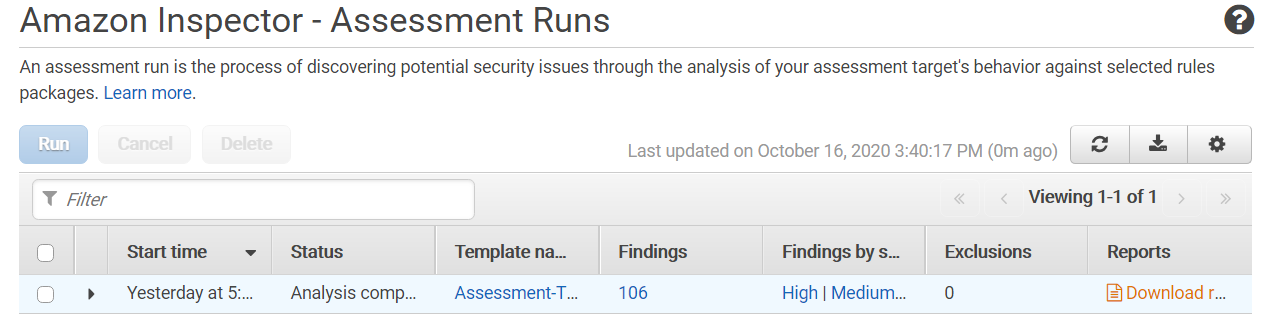
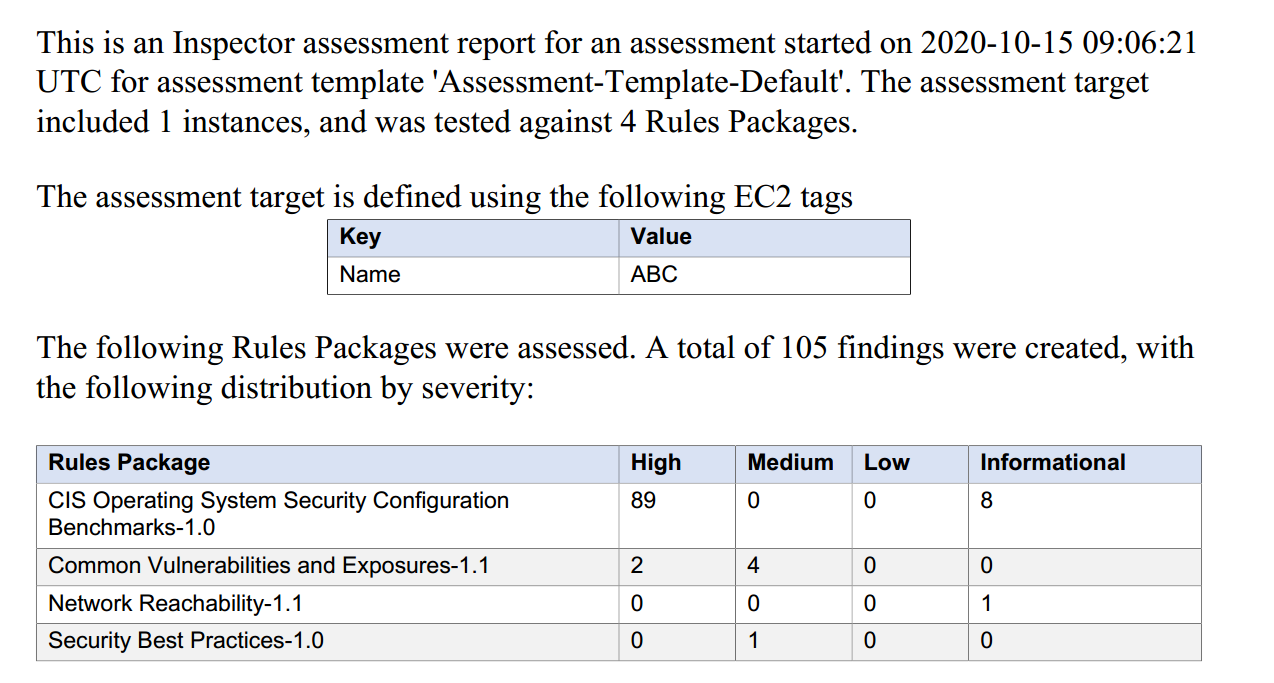
下载报告,查询结论
下载报告
Using public cloud services, you can easily and flexibly create an infrastructure with just a few clicks, but if you ignore certain security checkpoints, it may provide many opportunities for malicious attackers. Amazon Inspector is an automated security assessment service that evaluates security vulnerabilities of deployed resources based on compliance in the Amazon cloud. In this article, we will understand how AWS Inspector communicates with EC2 instances to assess server security. We will also learn how to configure AWS Inspector to perform automated security assessment tasks.
Inspector Principles
AWS Inspector installs an agent on all EC2 instances, then internally checks for all possible vulnerabilities and provides detailed reports with recommended mitigation measures. It includes detailed results for selected resources. It prioritizes vulnerabilities based on their severity, allowing you to easily understand which software needs immediate patching.
Inspector Assessment Rule Packages
Network Reachability Rule Package
Rules in the Network Reachability package analyze your network configuration to find security vulnerabilities in your EC2 instances. Results generated by these rules indicate whether your ports can be reached from the Internet (via Internet Gateway, including instances behind Application Load Balancer or Classic Load Balancer), VPC peering connection, or VPN (via Virtual Gateway). These results also highlight network configurations that allow potential malicious access (such as improperly managed security groups, ACLs, IGWs, etc.). With this rule package, you can evaluate your EC2 instances without the Amazon Inspector agent.
Host Assessment Rule Package
Common Vulnerabilities and Exposures (CVE)
The Amazon Inspector host assessment rule package uses agents deployed on Amazon EC2 instances running the applications to be evaluated. It checks servers using best security practice guidelines. Rules in this package help verify whether EC2 instances in your assessment targets are susceptible to Common Vulnerabilities and Exposures (CVE).
CVE is a list of publicly known cybersecurity vulnerabilities, each entry contains an identification number, description, and at least one public reference. CVE entries are used in many cybersecurity products and services worldwide, including the National Vulnerability Database (NVD).
If a specific CVE appears in the results generated by Amazon Inspector assessment, you can search for the CVE ID (for example, CVE-2009-0021) at https://cve.mitre.org/. The search results provide detailed information about the CVE's severity and mitigation methods.
Center for Internet Security (CIS) Benchmarks
The CIS Security Benchmark Program provides well-defined, unbiased, consensus-based industry best practices to help organizations assess and improve their security.
If a specific CIS benchmark appears in the results generated by Amazon Inspector assessment run, you can download a detailed description of this benchmark in PDF format from https://benchmarks.cisecurity.org/ (free registration required). This benchmark document provides detailed information about the CIS benchmark's severity and how to mitigate it.
Amazon Inspector Security Best Practices
Use Amazon Inspector rules to help determine whether your system's configuration is secure. Topics include:
Inspector Pricing
Network Reachability Rule Package Pricing
Amazon Inspector assessments using the Network Reachability rule package are priced per instance assessment per month. For example, if you run 1 assessment on 1 instance, it counts as 1 instance assessment. If you run 1 assessment on 10 instances, it counts as 10 instance assessments. The starting price is 0.15 USD per instance assessment per month.
Host Assessment Rule Package Pricing
Assessments using the Host rule package are priced per agent assessment per month. For example, if you run 1 assessment on 1 agent, it counts as 1 agent assessment. If you run 1 assessment on 10 agents, it counts as 10 agent assessments. The starting price is 0.30 USD per instance assessment per month.
Inspector Practice
Download Installation Package and Install Agent
Configure and Run Inspector Scan
Enter Inspector product module
Configure and select rule package
Define target
Run scan
Download Report and View Results
Download report