转自亚马逊AWS官方博客
该方案模拟在阿里云上的WordPress cluster应用通过 Cold Backup 的方式备份到 AWS 宁夏区域。RTO 和 RPO 目标均为 24 小时。
阿里云上的部署如下:
- RDS MySQL:WordPress 数据库
- 云数据库版Redis:使用 Redis Object Cache 插件,使 WordPress 支持 Redis 作为缓存
- 对象存储OSS:WordPress 的文件存储在 OSS 上,通过 OSSFS 软件挂载到 ECS
- 云服务器ECS:安装 WordPress 应用,通过弹性伸缩服务实现自动伸缩
- 负载均衡SLB:将接收到的流量转发给后端的 WordPress 集群
架构
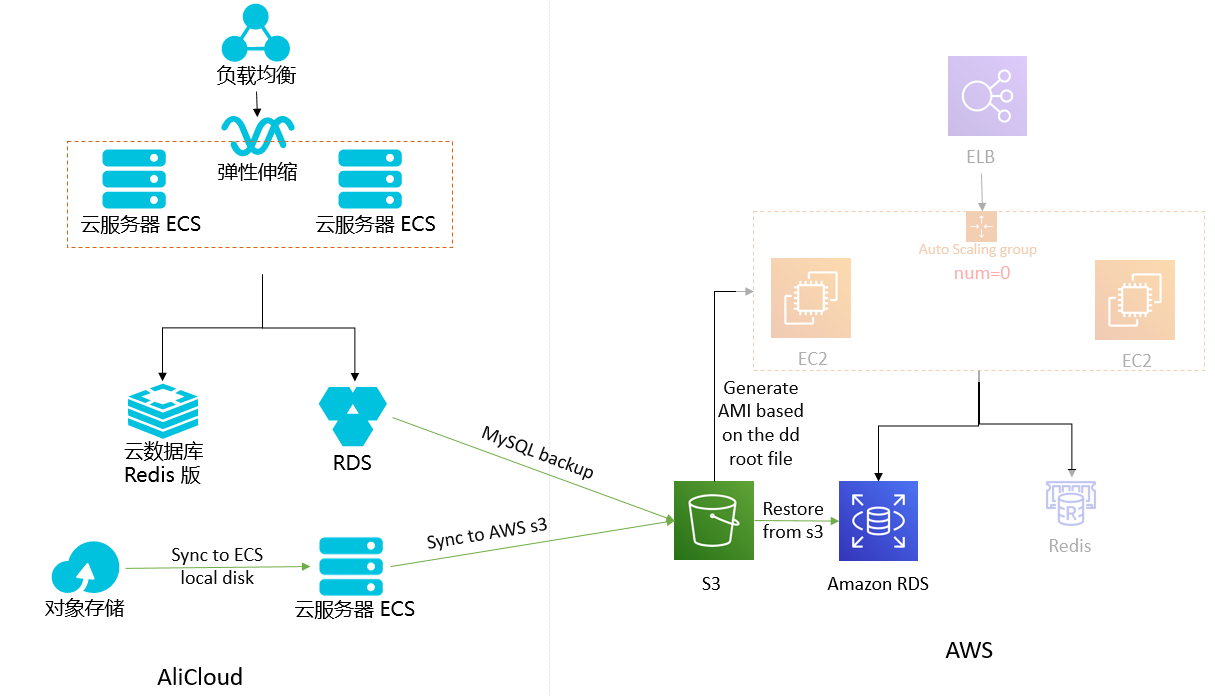
解决方案
备份方案
- 把阿里云数据库和OSS中的数据每天备份并传输到AWS平台上,一旦阿里云环境出现故障,可以在AWS平台上快速启动应用系统。
- 本方案中暂时不考虑直接迁移阿里云的ECS服务器到AWS平台,假定应用系统预先在AWS上做好了AMI。
- 每天对阿里云的RDS进行备份,并把备份文件传输到AWS S3。
- 启动一台阿里云ECS服务器,挂载普通云盘,通过脚本每天进行增量同步到本地磁盘,然后通过 awscli 的 s3 sync 命令同步到AWS S3。
- ELB、NAT、Redis、App、Database 这些都不启动,等到受灾之后通过脚本启动。
恢复方案
- 通过阿里云MySQL RDS在S3中的备份,恢复一个新的Amazon RDS实例。
- Redis不含持久化数据,无需实现复制,只需脚本启动即可。
- 提前在宁夏区配置好网络环境,当灾难发生时,通过脚本启动资源;手动或通过脚本自动导入 MySQL 数据。
恢复脚本及使用方法已上传到 GitHub: aws-dr-samples。
备份步骤
RDS 数据库备份
# 备份数据库
mysqldump -h <host> -u root -p wordpress > wordpress.sql
# 上传到 S3
aws s3 cp wordpress.sql s3://<bucket>/<path>/
备份OSS的数据到AWS S3
# 挂载OSS bucket到本地目录后,增量同步到AWS S3
aws s3 sync <local_path> s3://<bucket>/<path>/

# 完整的 backup.sh 脚本
currentdate=`date +%Y%m%d`
mysqldump -h <host> -u root -p wordpress > wordpress.sql
aws s3 cp wordpress.sql s3://<bucket>/<path>/$currentdate/
aws s3 sync <local_path> s3://<bucket>/<path>/$currentdate/
自动化备份
编写 cronjob,每天晚上定期执行 backup.sh,例如每天晚上10:30进行备份:
30 22 * * * /root/backup.sh
返回技术博客
Reprinted from the AWS Official Blog
This solution demonstrates how a WordPress cluster running on Alibaba Cloud can be backed up to the AWS Ningxia region using a Cold Backup strategy. Both RTO and RPO targets are 24 hours.
The Alibaba Cloud deployment includes:
- RDS MySQL: WordPress database
- ApsaraDB for Redis: Using the Redis Object Cache plugin to enable Redis caching for WordPress
- Object Storage OSS: WordPress files stored in OSS, mounted to ECS via OSSFS
- ECS: WordPress application server with Auto Scaling
- SLB: Load balancer forwarding traffic to the WordPress cluster
Architecture
Solution
Backup Strategy
- Back up Alibaba Cloud database and OSS data daily and transfer to AWS, so the application can be quickly launched on AWS if Alibaba Cloud fails.
- This solution does not directly migrate Alibaba Cloud ECS servers to AWS. It assumes the application AMI has been pre-built on AWS.
- Back up the Alibaba Cloud RDS daily and transfer the backup file to AWS S3.
- Launch an Alibaba Cloud ECS server, mount a cloud disk, perform incremental sync to local disk daily via script, then sync to AWS S3 using the AWS CLI
s3 sync command.
- ELB, NAT, Redis, App, and Database are not started until a disaster occurs, at which point they are launched via script.
Recovery Strategy
- Restore a new Amazon RDS instance from the Alibaba Cloud MySQL RDS backup stored in S3.
- Redis contains no persistent data — no replication needed, just launch via script.
- Pre-configure the network environment in the Ningxia region. When a disaster occurs, launch resources via script and import MySQL data manually or automatically.
Recovery scripts and usage instructions are available on GitHub: aws-dr-samples.
Backup Steps
RDS Database Backup
# Backup the database
mysqldump -h <host> -u root -p wordpress > wordpress.sql
# Upload to S3
aws s3 cp wordpress.sql s3://<bucket>/<path>/
Sync OSS Data to AWS S3
# After mounting the OSS bucket locally, sync incrementally to AWS S3
aws s3 sync <local_path> s3://<bucket>/<path>/

# Complete backup.sh script
currentdate=`date +%Y%m%d`
mysqldump -h <host> -u root -p wordpress > wordpress.sql
aws s3 cp wordpress.sql s3://<bucket>/<path>/$currentdate/
aws s3 sync <local_path> s3://<bucket>/<path>/$currentdate/
Automated Backup
Set up a cronjob to run backup.sh nightly. For example, to run at 10:30 PM every day:
30 22 * * * /root/backup.sh
Back to Tech Blog